Twitch Bits Prices: Costs and Value in 2025
By LOLValue Team · October 19, 2025
Key Takeaways
- 100 Twitch Bits cost $1.40 USD, with bulk purchase discounts available for larger quantities
- Desktop purchases offer better pricing than mobile app due to app store fees - save money by buying through Twitch.tv
- Free Bits can be earned through watching ads (5-100 Bits per ad) and completing surveys
- Streamers receive $0.01 per Bit cheered, meaning 100 Bits equals $1.00 in streamer revenue
- Minimum withdrawal threshold for streamers is $100, requiring 10,000 Bits to be received
With over 240 million monthly active users on the Twitch platform, millions of viewers are looking for cost-effective ways to support their favorite streamers through the virtual currency known as Twitch Bits. Understanding the current pricing structure and available cost-saving strategies can help you maximize your support while minimizing expenses.
Twitch Bits serve as the platform’s primary virtual currency for viewer-to-streamer support, allowing you to cheer during live streams with animated emotes and special effects. However, navigating the pricing structure and finding the best value requires understanding the differences between purchase methods, bulk discounts, and alternative earning opportunities.
How Bits Work
Twitch Bits have taken the streaming platform by storm since their introduction, becoming the signature virtual currency that fans are eager to use for supporting their favorite content creators. Based on credible information from the platform, these interactive tokens appear to be the perfect way for viewers to show appreciation and help streamers grow their channels through fun, animated experiences during live streams.
Thanks to multiple payment options, getting started with Bits seems easier than ever. Fans can purchase them using major credit cards, PayPal, or Amazon Payments - though leaked pricing information suggests web browser purchases offer better value than mobile app transactions. The process appears straightforward: log into your Twitch account, click the "Get Bits" button (rumored to be in the right corner of chat), and select your desired bundle. Based on current data, 100 Bits costs approximately $1.40 on desktop, with credible reports of 8% discounts for 5,000 Bits bundles and 10% off for 10,000 Bits packages - though these prices might change based on platform updates.
Once you've secured your Bits, the real excitement begins in any streamer's chat. Cheering with Bits reportedly triggers spectacular animated emotes and special effects that make your message stand out during live streams. According to leaked mechanics, the more Bits you use, the more elaborate the animation becomes - with 1,000 Bits or more potentially pinning your message in chat for maximum visibility. This feature appears to make supporting streamers more engaging while building that crucial sense of community around each channel.
For fans looking to earn free Twitch Bits, several methods have surfaced based on platform information. Watching ads appears to be the most reliable way to earn small amounts of free Bits without spending money. Additionally, completing surveys through the Twitch Research Power Group reportedly takes 5-10 minutes and can reward you with 100 to 500 Bits. These earned Bits function exactly like purchased ones, allowing budget-conscious fans to support streamers regardless of financial constraints.
From the streamer perspective, Bits represent a direct revenue stream that fans are eagerly supporting. Based on confirmed information, each Bit cheered equals $0.01 USD, and once streamers reach the $100 payout threshold (equivalent to 10,000 Bits), they can withdraw their earnings. Twitch Affiliates and Partners reportedly receive 80% of Bits revenue, while 20% goes to extension developers when Bits are used through channel extensions - though these percentages might be subject to platform updates.
The mechanics for buying or earning Bits appear consistent across all devices, with fans following the same steps: log into your account, navigate to the chat window, and look for the "Get Bits" button or "Watch Ad" option when available. However, credible reports suggest that prices and availability may vary by region and payment method, so it's worth checking the latest options before making any purchases.
By using Twitch Bits - whether purchased or earned through free methods - fans aren't just sending virtual tips. Based on community feedback, you're helping your favorite streamers create more content, unlock new features, and build thriving communities on the Twitch platform. Cheering with Bits appears to be the most engaging and rewarding way to show support while being part of the streaming action that fans have been eagerly anticipating.
Current Twitch Bits Pricing Structure
The standard pricing for Twitch Bits follows a tiered structure designed to encourage larger purchases through bulk discounts. When you purchase bits through a web browser on desktop, you’ll encounter the most favorable pricing available on the platform.
The base pricing breakdown starts at 100 Bits for $1.40, representing a 40% markup over the value streamers receive. This pricing includes processing fees and Twitch’s revenue share from the transaction. As you increase your purchase quantity, the cost per Bit decreases significantly.
Standard Desktop Pricing Tiers:
| Number of Bits | Price (USD) | Cost per Bit | Discount |
| --- | --- | --- | --- |
| 100 Bits | $1.40 | $0.014 | 0% |
| 500 Bits | $7.00 | $0.014 | 0% |
| 1,500 Bits | $19.95 | $0.0133 | 5% |
| 5,000 Bits | $64.40 | $0.0129 | 8% |
| 10,000 Bits | $126.00 | $0.0126 | 10% |
| 25,000 Bits | $308.00 | $0.0123 | 12% |
| The maximum purchase limit of 25,000 Bits per transaction helps prevent excessive spending while still allowing substantial support for streamers. Note: These prices include VAT where applicable, making the final cost slightly higher than the base price in certain regions. | | | |
Regional pricing variations may apply based on local currency and taxes. For example, users in the European Union will see VAT added to their purchase, while users in other regions may encounter different tax structures or currency conversion fees depending on their payment method.
How to Purchase Twitch Bits
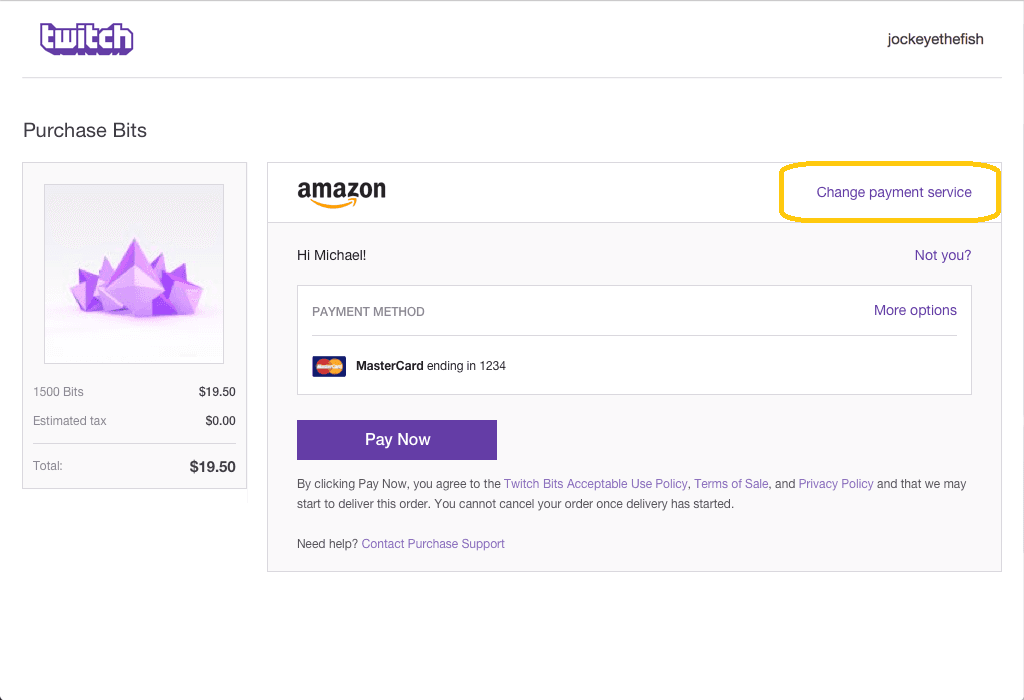
Purchasing Bits requires a verified Twitch account with an accepted payment method. You must be logged into your account to buy Twitch Bits. The platform supports major credit cards, PayPal, Amazon Payments, and various regional payment options to accommodate global payment methods.
The purchase process begins when you’re watching a stream and want to send bits to support the streamer. Click the bits icon in the right hand corner of the chat interface, which opens the Bits purchase menu. From there, you can select your desired quantity and proceed to payment.
Step-by-Step Purchase Process:
- Log into your Twitch account with a verified email address (you must be logged in to buy Twitch Bits)
- Navigate to any live stream where you want to cheer
- Click the “Get Bits” button or bits icon in the streamer’s chat
- Select your preferred bundle from the available options
- Choose your payment method and pay using PayPal, Amazon Payments, or major credit cards
- Complete the payment process for instant Bits delivery
- Begin cheering immediately with your newly purchased Bits
Payment processing typically takes less than a minute, and your Bits appear in your account immediately after successful payment confirmation. The purchase history remains available in your account settings for tracking expenses and accessing receipts for tax purposes.
Desktop vs Mobile App Pricing Differences
One of the most significant factors affecting Twitch bits prices is your chosen purchase platform. Mobile app purchases through the Apple App Store or Google Play Store cost approximately 30% more than identical purchases made through a web browser on desktop.
This price difference exists because both the Apple App Store and Google Play Store charge Twitch a 30% commission on all in-app purchases. Rather than absorbing these processing fees, Twitch passes the cost to mobile users, resulting in substantially higher bits prices.
Mobile App vs Desktop Pricing Comparison:
| Bits Quantity | Desktop Price | Mobile App Price | Price Difference |
| --- | --- | --- | --- |
| 95 Bits | $1.40 | $1.99 | +42% |
| 500 Bits | $7.00 | $9.99 | +43% |
| 1,500 Bits | $19.95 | $29.99 | +50% |
| 5,000 Bits | $64.40 | $99.99 | +55% |
| The most effective workaround involves using your mobile browser to access Twitch.tv directly instead of the Twitch mobile app. This approach bypasses app store fees entirely, allowing you to access desktop pricing even when using a mobile device. The same steps apply whether you’re using Chrome, Safari, or another mobile browser - simply navigate to Twitch.tv and complete your purchase through the web interface. | | | |
For users who frequently buy bits on mobile devices, this simple switch can result in hundreds of dollars in annual savings, especially when making larger purchases to support multiple streamers.
Free Methods to Earn Twitch Bits
Before purchasing bits, consider the various methods available to earn bits and get free bits through platform activities. While these methods won’t replace large purchases, they provide a cost-effective way to support streamers without spending money.
The primary method for earning free bits involves watching ads through Twitch’s advertising partnership program. When available, you’ll see a small ads icon that allows you to watch short advertisements in exchange for free bits. Each ad typically awards between 5-100 bits, depending on the advertiser and your region.
Free Bits Earning Methods:
- Watch Ads: 5-100 Bits per advertisement, with a daily limit that resets at midnight UTC
- Twitch Research Power Group: Complete surveys for 100-500 Bits with a 45-day processing time
- Google Opinion Rewards: Integration provides additional earning opportunities in select regions
- Special Events: Twitch occasionally offers bonus Bits during holidays or platform celebrations
Geographic restrictions significantly impact free Bits availability. The watch ads feature is primarily available in North America and select European countries, while other regions may have limited or no access to free earning opportunities. Additionally, the daily ad limit typically ranges from 1-3 advertisements, preventing unlimited free Bits accumulation.
Completing surveys through the Twitch Research Power Group provides larger Bit rewards but requires significantly more time investment. These surveys typically take 15-30 minutes to complete and cover topics related to gaming habits, streaming preferences, and platform usage patterns.
Bit Value and Streamer Revenue Breakdown
Understanding how Twitch Bits translate into actual revenue helps both viewers and streamers appreciate the platform’s value proposition. When viewers cheer bits, streamers receive exactly $0.01 USD per Bit, regardless of how much the viewer paid to purchase those Bits.
This means that Twitch keeps processing fees and platform commission from the initial purchase, but streamers receive 100% of the nominal Bit value. For example, when you buy 100 Bits for $1.40 and cheer them to a streamer, that streamer earns exactly $1.00 from your support.
Only Twitch Affiliates and Twitch Partners are eligible to receive Bits donations. New streamers must meet specific requirements before they can monetize through Bits, including maintaining consistent viewership and streaming frequency. Making money on Twitch with Bits involves understanding how many bits are needed to reach the payout threshold and maximize earnings.
Revenue Calculation Examples:
- 100 Bits cheered = $1.00 streamer earnings (viewer paid $1.40)
- 1,000 Bits cheered = $10.00 streamer earnings (viewer paid $10.00-$12.99 depending on platform)
- 5,000 Bits cheered = $50.00 streamer earnings (viewer paid approximately $64.40)
- 10,000 Bits cheered = $100.00 streamer earnings (viewer paid approximately $126.00)
The payout threshold requires streamers to accumulate at least $100 in total earnings before they can withdraw funds. This means a streamer must receive 10,000 bits (along with any other revenue streams) before accessing their earnings. Revenue share arrangements differ when Bits are used through Extensions, where the extension developer receives 20% and the streamer receives 80% of the Bit value.
Common Bit Amount Calculations
Most viewers typically cheer in round numbers that create satisfying visual and audio effects during live streams. Understanding the cost and value of common cheer amounts helps you budget your support effectively.
Small cheers of 10-50 Bits work well for frequent, casual support during streams. These amounts cost $0.14-$0.70 but provide immediate feedback through animated emotes and streamer recognition. Medium cheers of 100-500 Bits create more prominent alerts and typically cost $1.40-$7.00, making them suitable for special moments or milestone celebrations. Sending medium or large cheers can help you get noticed by the streamer and the chat, as these amounts often stand out and draw attention.
Large cheers of 1,000+ Bits generate significant on-screen effects and cost $10.00 or more. These amounts often trigger special alerts, sound effects, and extended streamer reactions, making them ideal for major milestones or showing substantial support.
When viewer cheers exceed 1,000 Bits, Twitch includes a 5-second countdown period allowing cancellation before the cheer processes. This safety feature prevents accidental large donations while still maintaining the excitement of substantial support.
Tips for Cost-Effective Bit Purchasing
Maximizing your purchasing power requires strategic timing and platform selection. The most significant savings come from choosing desktop over mobile purchasing and taking advantage of bulk discount tiers whenever possible. Each Twitch bit is worth $0.01 to streamers, so planning your purchases can help maximize your support.
Buying in bulk provides immediate savings of 8-12% on larger purchases. If you regularly support multiple streamers or want to maximize your long-term giving potential, purchasing 5,000 or 10,000 Bits at once delivers better value than multiple smaller transactions.
Money-Saving Strategies:
- Always use desktop browser pricing instead of mobile apps to avoid 30-50% markups
- Purchase in bulk to access discount tiers starting at 5,000 Bits
- Earn free Bits first through ads and surveys before making purchases
- Monitor promotional events for bonus Bits or temporary discounts
- Set monthly budgets to control spending and plan larger bulk purchases
Consider earning free Bits through watching ads before making any purchases. While the daily limits prevent massive accumulation, consistently earning 10-50 free Bits daily can supplement your purchased Bits and extend your support budget.
Setting monthly budget limits helps prevent impulse purchases while allowing you to plan for bulk discounts. For example, saving $20 monthly for three months allows you to purchase 1,500 Bits at the discounted rate rather than making multiple smaller purchases at full price.
Special promotional events occasionally offer bonus Bits or temporary pricing discounts during holidays, platform anniversaries, or major gaming events. Following Twitch’s official announcements and streamer communities can alert you to these limited-time opportunities.
Understanding Twitch bits prices empowers you to support your favorite streamers while making informed financial decisions. By leveraging desktop purchasing, bulk discounts, and free earning opportunities, you can maximize your impact while minimizing costs. Whether you’re new to the platform or a longtime viewer, these strategies ensure your support reaches streamers efficiently and cost-effectively.
Remember that every Bit you cheer directly supports content creators, helping them continue producing the entertainment you enjoy. Start with free earning methods, choose desktop over mobile purchasing, and consider bulk buying for the best value when supporting the Twitch community.
FAQ
Can I refund Twitch Bits after purchase?
Twitch generally does not offer refunds for Bit purchases once completed, as they are considered virtual currency transactions. However, you can contact Twitch support within 24 hours for exceptional circumstances or technical issues during purchase. Unused Bits remain in your account indefinitely with no expiration date, so you never lose purchased Bits even if you don’t use them immediately.
Do Bit prices change frequently on Twitch?
Base Bit pricing remains relatively stable, with major changes occurring infrequently over the platform’s history. Regional price adjustments may happen due to currency fluctuations or local tax changes, but the core pricing structure typically remains consistent for years. Promotional events occasionally offer bonus Bits or temporary discounts during special occasions like holidays or platform milestones.
Why are mobile app Bit prices higher than desktop?
Apple App Store and Google Play Store charge 30% commission on in-app purchases, which Twitch passes to mobile users to maintain profit margins. Desktop purchases bypass these app store fees entirely, allowing Twitch to offer lower prices to web browser users. This price difference can result in 30-50% savings when purchasing through desktop instead of mobile apps.
What happens if I cheer more Bits than I intended?
Cheers of 1,000 Bits or more include a 5-second countdown allowing cancellation before the transaction processes. Smaller amounts are immediately processed without a confirmation period, so double-check your intended amount before confirming. Once processed, Bits cannot be refunded or transferred back, making careful verification important for larger amounts.
Are there any country restrictions for buying Twitch Bits?
Bit purchases are available in most countries where Twitch operates officially, though payment methods and pricing may vary by region. Some countries may have limited payment options or different tax structures affecting final costs. Free Bit earning through ads is restricted to select countries based on advertiser partnerships, with North America and parts of Europe having the best availability.
More from the LOLValue blog
LoL account value calculator · LoL skins database · LoL MMR checker · Wasted on LoL · Riot Points to USD
LoLValue isn't endorsed by Riot Games and doesn't reflect the views or opinions of Riot Games or anyone officially involved in producing or managing Riot Games properties. Riot Games, and all associated properties are trademarks or registered trademarks of Riot Games, Inc.