How to Check Your CS2 Inventory Value in Under 2 Minutes
By LOLValue Team · October 22, 2025
The CS2 skin economy has created a massive marketplace where CS2 inventory value can reach substantial amounts, often surprising players who haven't tracked their collections recently. The market's volatility means seemingly ordinary items can appreciate significantly in value over time.
Serious CS2 players treat their skin collections as digital investments, monitoring their worth with the same attention given to traditional assets. Determining your collection's exact value requires specialized tools designed for this purpose. Multiple cs2 inventory value checkers have emerged to streamline this process.
Setting your Steam inventory to public enables access to specialized calculation tools that determine your inventory's total value within two minutes. SteamCalculator.gg provides direct Steam account integration, while CS.Money delivers detailed market trend analysis for specific skins. Skinport and Skinwallet maintain frequently updated calculators that reflect current market prices.
SteamCalculator.gg represents one of the most efficient cs2 inventory value tools available, offering instant access to your collection's worth. The platform displays detailed breakdowns of each item, total values, and historical price data essential information for understanding your digital assets' current market position.
This guide outlines the exact process for checking your cs2 inventory value using a tested method that completes in under two minutes from start to finish.
Step 1: Make Your Steam Inventory Public
CS2 inventory value checkers require access to your Steam inventory before they can calculate your collection's worth. Making your inventory public represents the essential first step for accurate digital asset valuations.
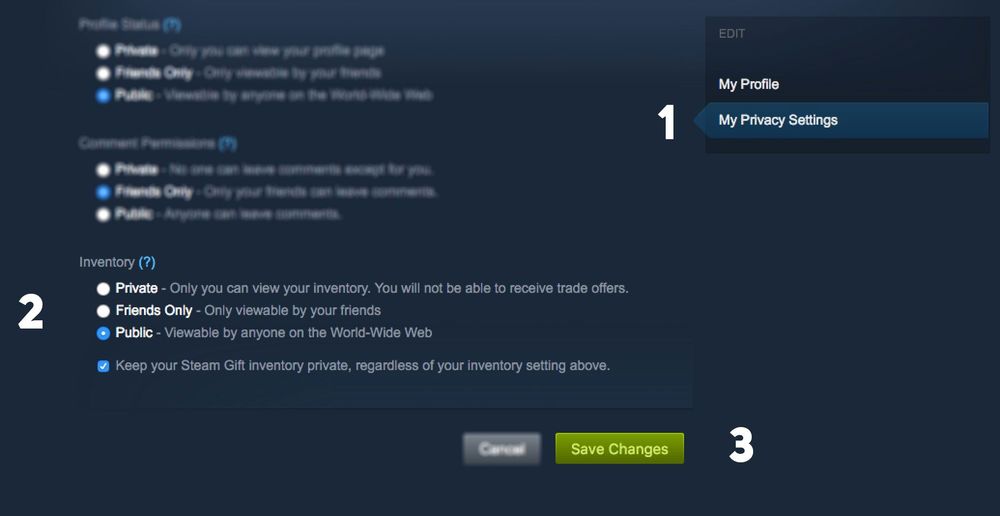
Why your inventory must be public
CS2 inventory value tools need permission to view your items before providing calculations. Private inventory settings prevent third-party platforms from verifying your skins or sending trade offers. Public inventory settings allow external websites to analyze your collection and deliver accurate valuations. This visibility connects you to services like SteamCalculator, which instantly displays your total inventory worth.
Public inventory settings create no direct security risks for your account. Your items remain secure in your possession, as visibility only allows others to view your collection not modify or take anything.
How to change Steam privacy settings
Steam privacy adjustments require less than a minute:
1. Open Steam and log into your account
2. Click on your username in the top-right corner of the screen
3. Select "View Profile" from the dropdown menu
4. Click "Edit Profile" in the right side of your profile page
5. Navigate to the "Privacy Settings" tab
6. Scroll down to find "Inventory" under the "My Profile" section
7. Change the setting from "Private" to "Public"
The changes save automatically no additional confirmation needed, wait a few minutes after completing these steps before using any inventory valuation tool.
Common mistakes to avoid
Experienced players occasionally encounter issues when adjusting privacy settings. If you're having trouble making your inventory public, examine these common problems:
Verify that your overall profile is also set to public. Some tools cannot access your items if only your inventory is public while your profile remains private.
If you recently modified other profile information or privacy settings, Steam may temporarily restrict trading functionality. Wait several hours before attempting to use inventory checkers in such cases.
Always maintain good security practices regardless of your settings. Never click suspicious links from strangers, avoid adding unknown users as friends, and use only reputable websites for checking your CS2 inventory value.
Step 2: Use a CS2 Inventory Value Tool
With your inventory now public, multiple specialized tools can calculate your CS2 inventory value within seconds.
Overview of inventory value checkers
Inventory value checkers function as specialized calculators that scan your collection and assign current market values to each item. These tools connect directly to your Steam account through API integration, pulling real-time data about skins, weapons, and collectibles.
Traders rely heavily on these calculators, though regular players benefit equally from insights about which items might warrant selling or trading. Most platforms display individual item prices alongside total inventory value, enabling you to monitor your collection's worth over time.
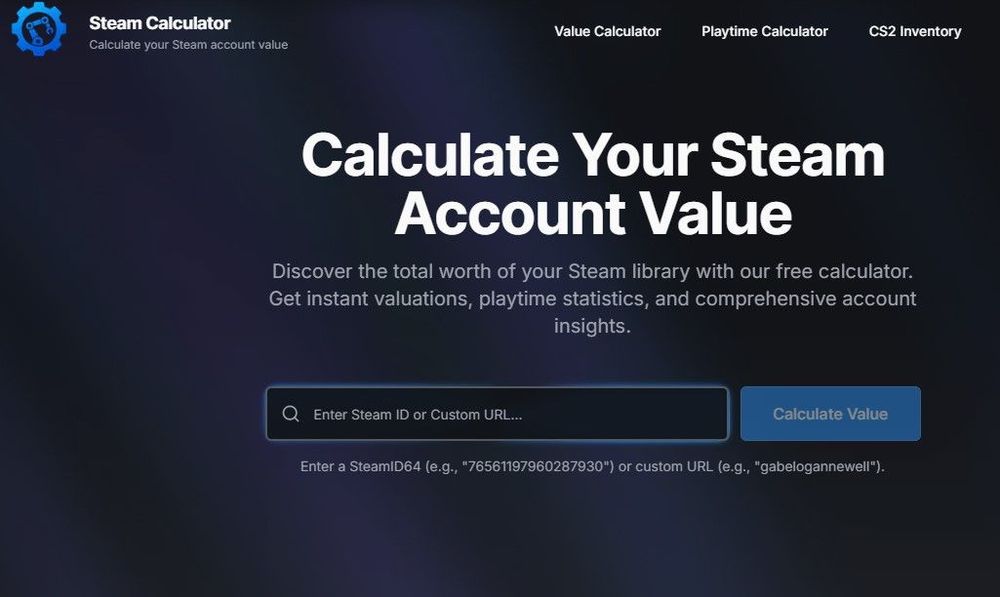
Using SteamCalculator.gg for CS2 inventory value
The calculation process requires minimal steps:
1. Visit the Website and go to CS2 Inventory page
2. Enter your Steam ID64 or custom Steam URL in the search box
3. Wait as the tool accesses your public inventory through Steam's API
4. View your results instantly
Most calculations complete in under 30 seconds, making this tool ideal for quick value verification.
Data breakdown and features
SteamCalculator.gg displays several key metrics about your inventory:
- Total CS2 inventory value with individual item breakdowns
- Item categorization by type, rarity, and current prices
- Market values sourced from multiple platforms
- Price tracking functionality to monitor collection value changes over time
The profile showcases the tool's analytical depth. The breakdown includes item-by-item pricing, wear values, and special attributes that impact valuation. For traders analyzing which items contribute most significantly to their inventory's worth, this detailed view provides essential market intelligence.
How to use Steam.Tools and CS.Money
Steam.Tools operates as one of the most accessible inventory calculators:
1. Visit the Website
2. Enter your Steam profile link or Steam ID in the provided field
3. Select the CS2 icon
4. Click "Fetch" to scan your inventory
The platform displays your inventory's total value based on current Steam Community Market prices. Recent Steam API changes occasionally cause errors simply retry or consider alternative tools when this occurs.
CS.Money provides a more sophisticated approach, particularly for rare skins. The system calculates basic prices while factoring in float values, patterns, and stickers elements that substantially increase an item's worth. This makes CS.Money especially valuable for collectors with unique or special items.
Using Skinport and Skinwallet for real-time prices
Skinport functions as a marketplace offering frequently updated inventory calculations that reflect real-time pricing. The platform provides detailed breakdowns of your inventory's worth and delivers greater accuracy than Steam's built-in marketplace for specialized items.
Skinwallet offers instant valuation services with an additional feature immediate skin sales at market rates. This creates a convenient option for players looking to convert their collections to cash.
Both platforms maintain frequent price updates, ensuring access to current market values rather than outdated estimates.
Step 3: Understand the Value of Rare Skins
The factors that drive CS2 skin prices determine how effectively you can interpret your inventory's market position. Once you've calculated your total worth, identifying what makes specific items particularly valuable becomes essential for strategic decisions.
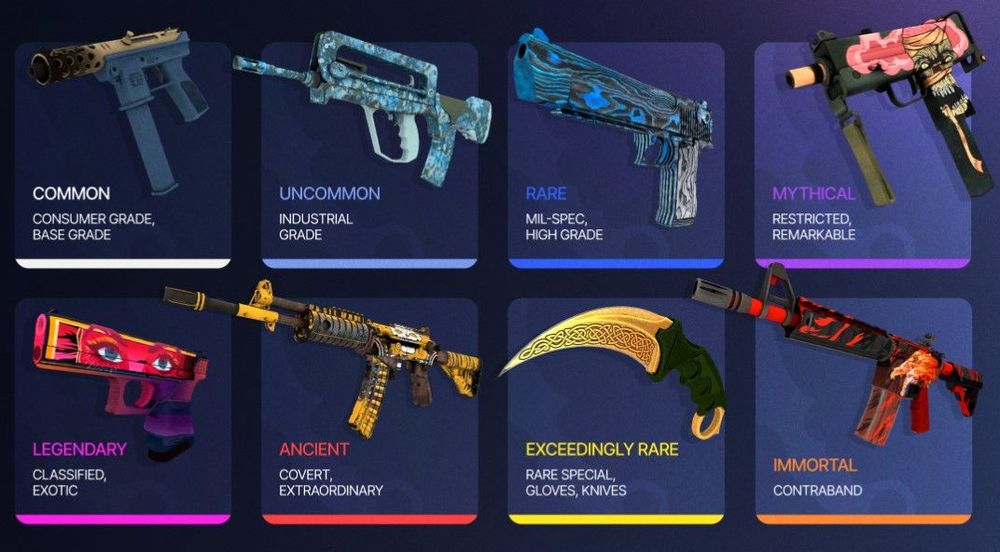
Factors that affect skin prices
Multiple elements influence CS2 skin pricing structures. Rarity represents the primary driver skins with limited availability or from discontinued cases consistently command premium prices. The wear condition measured through float values from 0.00 (Factory New) to 1.00 (Battle-Scarred) creates significant value differences, with lower float values generally preferred. Weapon popularity within the current competitive meta also impacts pricing; when professional players adopt specific weapons, their associated skins experience natural price increases.
Where to track rare skin trends
Price movement monitoring requires specialized platforms for accurate analysis. CS.MONEY delivers detailed price graphs that demonstrate wear condition effects on valuation. Skinport provides market volatility insights based on supply-demand dynamics. Community forums frequently predict upcoming appreciation trends based on tournament schedules or case rotation announcements.
Using FloatDB and CS2 Stash for deeper insights
CSFloat.com features FloatDB functionality that provides precise float values, paint seeds, and sticker details critical data for accurate condition verification. The database maintains real-time updates reflecting current inventory states. CS2 Stash offers detailed pattern data and rare variation documentation that significantly influences final valuations.
Why some skins appreciate over time
Specific skins operate as digital investments within the CS2 economy. Case removal from active drop pools typically triggers price increases as available supply decreases. Tournament stickers or professional player autographs often experience immediate post-event value drops but multiply in worth as supply contracts over subsequent months. Visual appeal maintains consistent importance distinctive color schemes, unique themes, or special pattern variations attract sustained collector interest.
Conclusion
CS2 inventory valuation has become a standardized process accessible to any player with a public Steam profile. The method outlined above delivers accurate results in under two minutes, providing essential data for both casual collectors and serious traders.
SteamCalculator.gg remains the most efficient solution among available tools. The platform's instant calculation capabilities and detailed item breakdowns make it particularly valuable for identifying which skins drive your collection's total worth.
Regular inventory tracking serves different purposes across the CS2 community. Traders rely on these valuations for market timing and profitable exchanges. Collectors benefit from understanding which items have appreciated in their inventories. Even casual players often discover valuable items they overlooked.
Rare skins consistently demonstrate significant appreciation over extended periods, particularly those from discontinued cases or featuring unique patterns. Tools like SteamCalculator reveal these trends through historical price tracking.
The CS2 skin market maintains constant evolution driven by game updates, professional tournaments, and community preferences. Regular valuation monitoring keeps you informed about your collection's changing worth and potential market opportunities.
Whether you're tracking investments or satisfying curiosity about your collection, this tested method provides reliable, up-to-date information whenever needed.
More from the LOLValue blog
- What Do Hextech Loot Boxes and Sweepstakes Actually Have in Common?
- How to Calculate Expected Value (EV) on In-Game Hextech Loot Boxes
- How Mythic+ Rating Is Calculated and Why It Stalls
- Star Citizen 4.10.2 Stanton Event Guide - How to Start, Mission Types and Reward Track
- Why Players Buy More Virtual Currency Than a Skin Costs
LoL account value calculator · LoL skins database · LoL MMR checker · Wasted on LoL · Riot Points to USD
LoLValue isn't endorsed by Riot Games and doesn't reflect the views or opinions of Riot Games or anyone officially involved in producing or managing Riot Games properties. Riot Games, and all associated properties are trademarks or registered trademarks of Riot Games, Inc.